Resident Work Hours Checker · Free
A resident duty hours calculator that finds the violation before the schedule goes out.
Enter a four-week block, or paste it from your spreadsheet. See the weekly average, days off, longest stretch, rest after call and call count, with every problem pinned to a date. Then download a PDF report. No account, no upload.
For chief residents, program coordinators, program directors and residents. Dates and times only, never patients.
Why schedules break the work hour rules
Most violations are not planned. A call swap moves a 24-hour shift next to a morning clinic, a holiday week loses its day off, or a moonlighting shift lands in a heavy block. Each change looks fine on its own; the problem only shows up when someone adds up four weeks of hours, gaps and calls by hand.
Programs log actual hours after the fact, so a bad schedule is usually found once a resident has already worked it. Resident Work Hours Checker moves the check to before the schedule is published: put in the block, read the result, fix the day it points to.
How the duty hours calculator works
1. Set the block
Pick the first day of the four weeks and the training level. Name the schedule by role or initials.
2. Add the shifts
One at a time, as a repeating pattern such as call every 4th night, or pasted from a spreadsheet. Overnight and 24-hour shifts are handled for you.
3. Read the checks
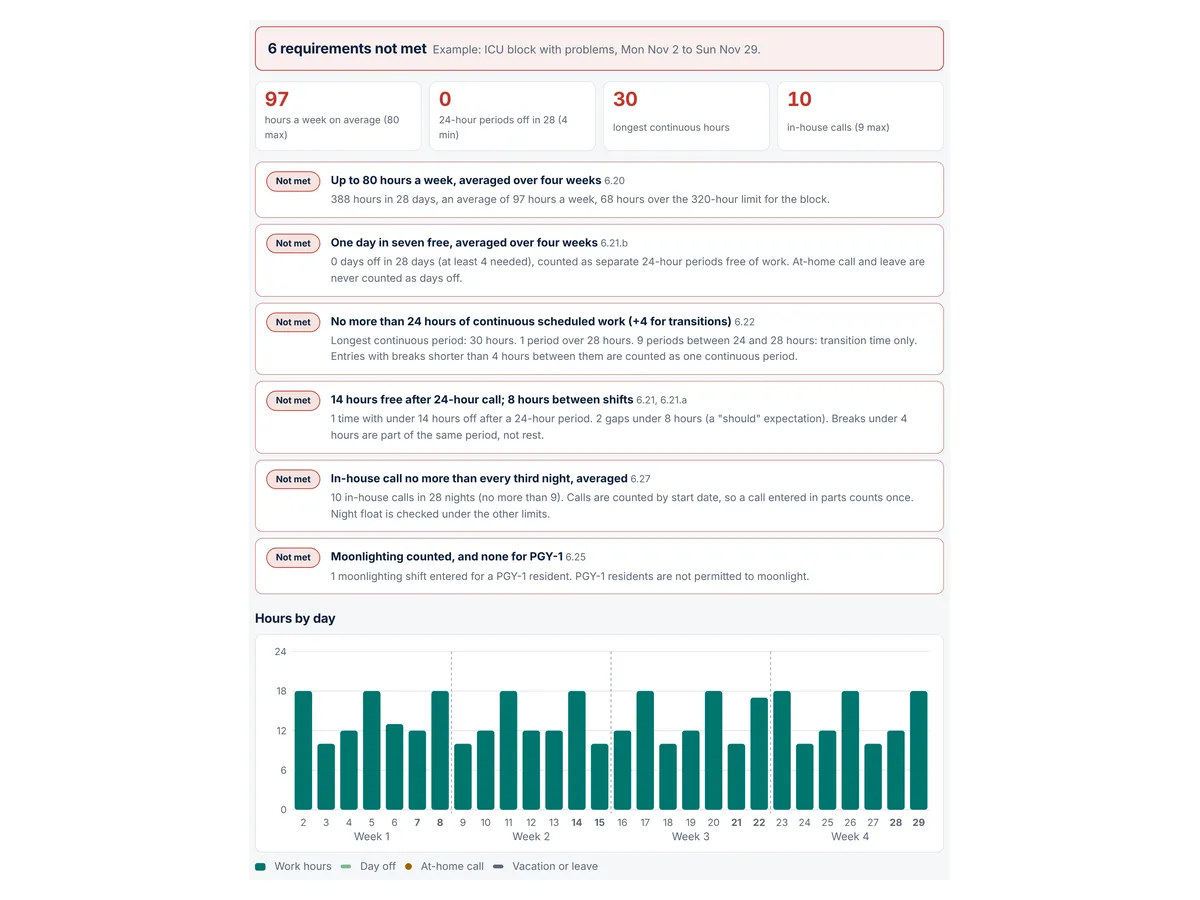
Six work hour checks covering the requirements below, each marked Meets, Review or Not met, with a findings list that names the exact shift.
4. Download the PDF
A report with the results, hours by week and day, every finding and the full shift list. Made in your browser.
What it checks: the resident work hours requirements
The checks follow the ACGME Common Program Requirements (Residency) effective July 1, 2026 (ACGME Common Program Requirements, Residency):
- The 80-hour rule (6.20): no more than 80 hours a week averaged over four weeks, including moonlighting and clinical work done from home.
- Time off between shifts (6.21): residents should have eight hours off between scheduled periods, and must have at least 14 hours free after 24 hours of in-house call (6.21.a).
- Days off (6.21.b): one day in seven free of clinical work and required education, averaged over four weeks. At-home call cannot be assigned on those days.
- 24 + 4 (6.22): no more than 24 hours of continuous scheduled clinical assignments, with up to four more hours for handoffs, patient safety and education, not new patients.
- Moonlighting (6.25): counted toward the 80 hours; PGY-1 residents are not permitted to moonlight.
- In-house call (6.27): no more often than every third night, averaged over four weeks, which is at most 9 calls in 28 nights.
- At-home call (6.28): only time spent on patient care counts toward the 80 hours.
Vacation and leave days are left out of the averages, as many GME offices do (see WVU School of Medicine one-day-in-seven guidance); follow your institution's policy.
Specialty Review Committees can set additional rules, and enforcement of the rotation-specific exception to 88 hours (6.24) is currently suspended while the requirements are revised. Treat the result as a careful second pair of eyes, not a ruling.
How to check a schedule for duty hour violations in five minutes
- Start a schedule and set the block start date and PGY level.
- Add the base pattern with Add a repeating shift, for example weekdays 07:00 to 17:00.
- Add call as in-house call every 3rd or 4th night, 07:00 to 07:00 the next day.
- Remove or edit the exceptions: post-call days, clinic afternoons, conferences, days off.
- Read the findings, fix each one, and download the PDF for your records or your program director.
Already keep the schedule in a grid, one row per resident? Paste the rows with your shift codes and every resident gets a schedule, with a summary table of who meets the rules. To try a swap, duplicate a schedule, change it and switch between the two. Three fictional examples are built in.
Who it is for
- Chief residents building call schedules and approving swaps.
- Program coordinators and directors reviewing a block before it is published, or answering a work hour concern with a clear record.
- Residents who want to know whether their own month adds up before they live it.
Pricing
The free checker is complete and live now.
Free
- Up to 50 schedules of 28 days, 300 entries each
- Six work hour checks with dated findings
- Paste a whole roster from your grid, with a summary of every schedule
- Repeating patterns and line-by-line paste
- PDF report, CSV export and JSON backup
Pro
or $59 a year, for one chief resident or coordinator
- Whole academic year with every rolling four-week window checked
- Excel (.xlsx) import and export
- One combined PDF for the whole roster
- Your program name on the PDF report
Team
for a residency program office: up to 10 editors; annual invoicing available
- Everything in Pro for each editor
- One shared roster the chiefs and coordinators edit together
- Swap check: test a proposed swap on both residents at once
- Specialty rule settings your program can adjust
Pro and Team are in early access. Reserving a spot is free and nobody is charged until their plan is activated. The prices shown are the planned launch prices, and we will email you from admin@med-rise.com before anything is billed.
Resident work hours FAQ
What does the ACGME 80-hour rule actually say?
Requirement 6.20 of the ACGME Common Program Requirements (Residency) limits clinical and educational work to no more than 80 hours per week, averaged over a four-week period, including in-house work, clinical work done from home and all moonlighting. One heavy week can be balanced by lighter ones; the checker shows each week and the four-week average.
How does the checker count days off?
The requirement is one day in seven free of clinical work and required education, averaged over four weeks, so at least four days off in 28. The ACGME defines a day off as one continuous 24-hour period free from all administrative, clinical and educational activities. By default the tool counts separate 24-hour periods with no work. You can switch to the stricter count of full calendar days, which many schedulers prefer. At-home call is never counted as a day off.
Is a 28-hour call a violation?
Scheduled clinical assignments must not exceed 24 continuous hours. Up to four additional hours may be used for patient safety activities such as handoffs and education, but not new patient care. The checker marks any period between 24 and 28 hours for review and any period over 28 hours as not met.
Does at-home call count toward the 80 hours?
Only the time spent on patient care while on at-home call counts. Enter the call window and the hours of patient care, such as phone calls and trips back to the hospital, and the tool adds those hours to the totals.
Which version of the requirements does it use?
The ACGME Common Program Requirements (Residency) effective July 1, 2026, requirements 6.20 to 6.28. Your Review Committee, institution or program may set stricter or different rules, and the ACGME has a major revision of the Common Program Requirements in progress, so confirm the version that applies to you. The tool is not affiliated with or endorsed by the ACGME.
Can it replace our official work hour logging?
No. Programs log and report actual hours in their own systems. This tool is for planning and reviewing a schedule before it is published, or for a resident to sanity-check a block. It is not a compliance determination.
How are vacation and leave handled?
Mark vacation or leave days with the Vacation or leave type, or a V in grid paste. Those days are left out when averaging hours, days off and call over the block, and they never count as days off. Many GME offices work this way; for example, West Virginia University's guidance says vacation days are removed from the total days for the month or four-week block. Follow your own institution's policy.
Where is my schedule stored?
Only in your browser's local storage on the device you use. Nothing is sent to MedRise, and the PDF report is made in your browser. Back up saves a file you can restore elsewhere, and Clear my data deletes everything. Never enter patient information; the tool only needs dates, times and shift types.
Check next block before you publish it
Free, private and ready in your browser. Load the fictional ICU example to see every kind of finding in one click.
Education and workflow support only. Resident Work Hours Checker applies the work hour requirements as written to the times you enter. It is not a compliance determination, does not replace your program's official work hour logging or your GME office's review, and is not affiliated with or endorsed by the ACGME. It is not for patient information. See the terms and disclaimer and privacy notice.